
New: Exam Templates & Global Settings
Setting up the same exam configuration again and again? Exam Templates are here to make that a quicker. You can now save your preferred exam settings as…
 Charlotte Gupta
Setting up the same exam configuration again and again? Exam Templates are here to make that a quicker.
You can now save your preferred exam settings as reusable templates, making it easy to create consistent exams without having to configure everything from scratch each time.
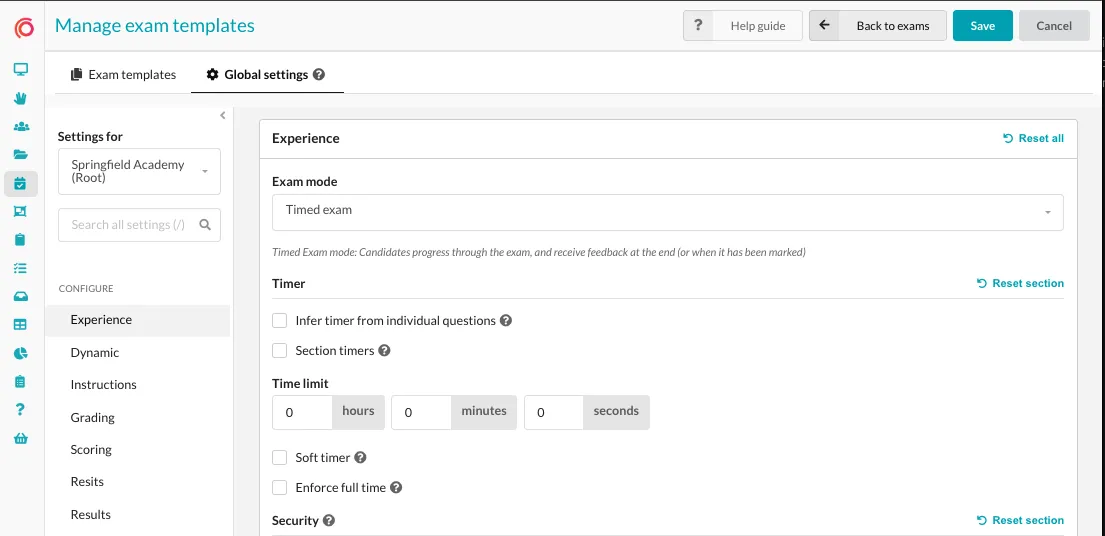
We've also introduced Global Settings, giving you control over the default configuration for every new exam created on your portal.
Create once, reuse again and again
Templates can store settings across almost every part of an exam, including:
- 🎨 Experience & instructions
- 🧮 Grading, scoring & resits
- 📊 Results & certificates
- 👀 Proctoring
- 🔐 Security & legal settings
- ✏️ Marking
- 📧 Communications
- 🧩 Sections and dynamic filters
When it's time to create an exam, simply choose your template and source quiz. Your saved configuration will already be applied, ready for you to make any exam-specific changes you need.
Turn existing exams into templates
Already have an exam configured exactly how you like it? You don't need to recreate it.
Templates can be created:
- From scratch
- From an existing quiz
- From an existing exam
This makes it easy to turn your existing exam setups into reusable templates for your team.
Click here to learn more
Originally published on Synap’s changelog.