
Improvements
Custom menu icons & custom note pages 🚀
From portal settings > user access > user type you can now customise a users: Add custom page names Add custom page descriptions Add a custom note page…
 Charlotte Gupta
From portal settings > user access > user type you can now customise a users:
- Add custom page names
- Add custom page descriptions
- Add a custom note page (limited to 3 per portal)
- Select custom menu icons
- Revert Changes back to a default
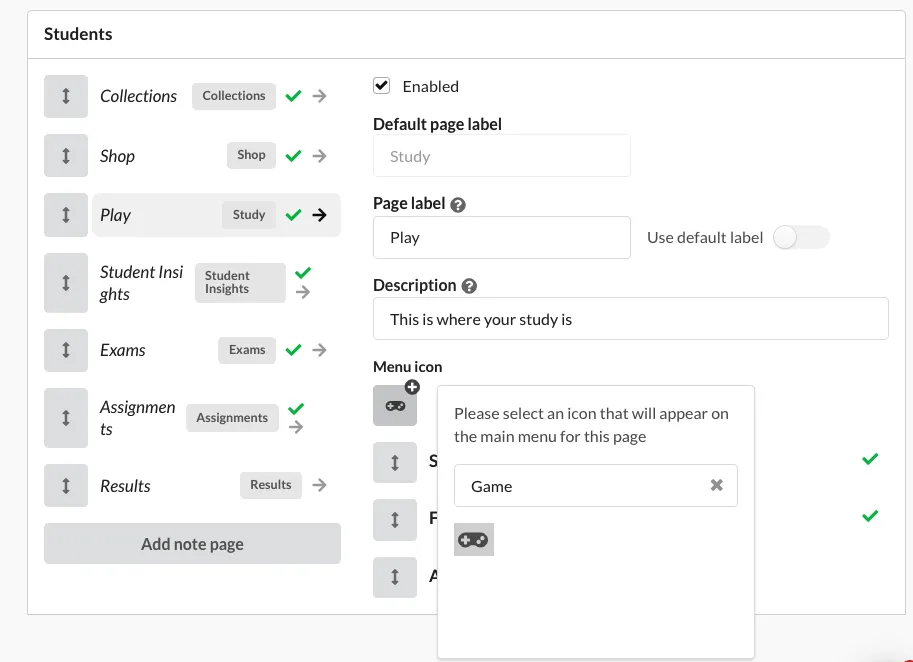
Adding in custom note pages means you can pin a note to the a users menu that could be anything:
- FAQs
- Links to more products or a store
- Guide to using the platform
- Requirements for a proctored exam
- Exam schedule
- Anything else you can think of!
Help docs for creating custom note pages and customising users page menu
Originally published on Synap’s changelog.