Deliver secure proctored exams with confidence

Stop candidates from cheating with built-in lockdown browser, ID checks and automated breach detection - all designed for high-stakes exam delivery on Synap.

  • ISO 27001
  • GDPR compliant
  • High-stakes exams
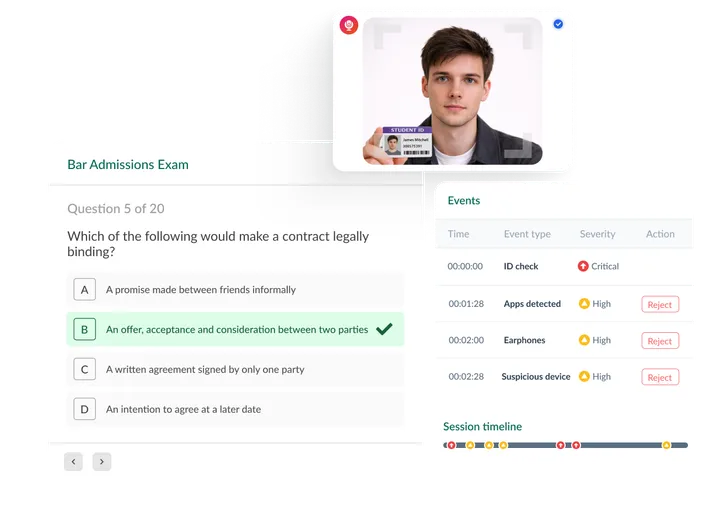
Proctored exam interface showing a multiple-choice question, candidate webcam feed with ID verification, realtime events log for flagged behaviour, and a session timeline.

Trusted to deliver secure exams at scale

  • 10M+

    Exams delivered

  • 10K+

    Simultaneous exam starts

  • 99.99%

    Uptime

Benefits

Why run proctored exams on Synap

One integrated stack for delivery, monitoring and audit-ready evidence.

  • Stop cheating in real time

    Any violation of exam conditions is instantly flagged as a breach - with the option to freeze the exam and keep the timer running.

  • Stop candidates from using AI

    Block AI tools like ChatGPT, Copilot and Gemini. Restrict copy-and-paste to protect exam integrity.

  • Lock down exams securely

    Lock candidates into a fullscreen exam environment, blocking extra tabs, external displays and unauthorised apps.

  • ID checks for exam candidates

    Candidates complete a photo ID check before the exam starts. Verification is captured and stored automatically for your records.

  • Flag & review incidents fast

    Breach counts are automatically tallied per candidate. Review timestamped video recordings or screenshots to focus on the highest priority incidents.

  • Works in low-bandwidth environments

    When the connection cannot sustain continuous video, intermittent screen and webcam captures still give you lighter, reviewable evidence.

Lockdown

Ensure a secure exam environment

Candidates cannot access other browsers, applications or AI tools during their test. They close everything before starting and remain in a secure full-screen mode throughout. For less restrictive setups, automatic detection gives you timestamped logs to support clear review decisions.
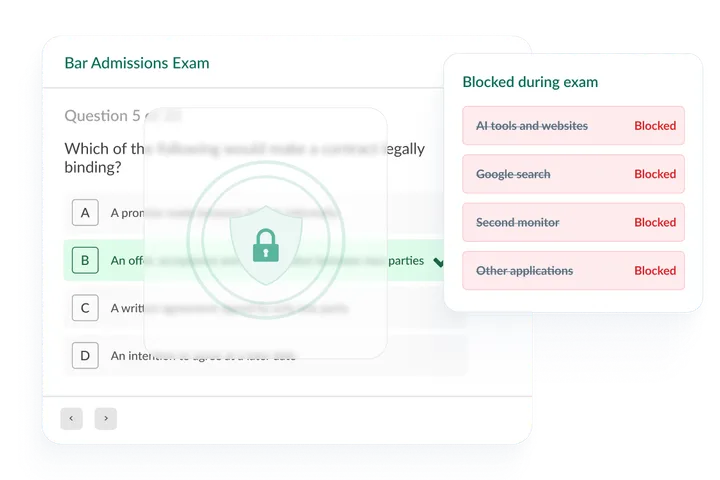
Online exam question with an Exam browser locked overlay: shield and padlock on a bar admissions exam screen.

Breach count

Save valuable time with automatic breach count

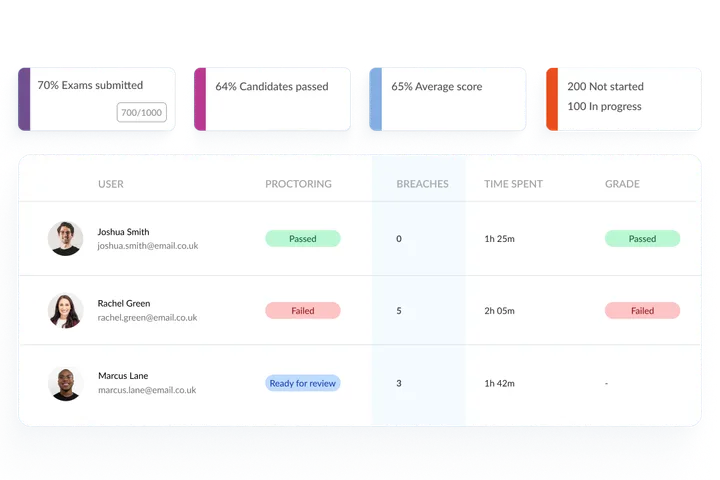
Easily identify the number of breaches per candidate, allowing you to concentrate on reviewing those instances and swiftly pass candidates with no breaches.

Breach count and proctoring review.

Comment system

Collaborate on decisions

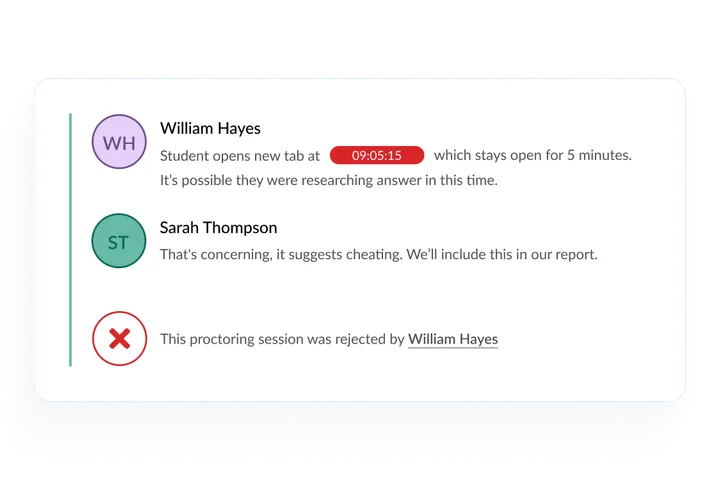
Add timestamped comments to proctoring footage to discuss breaches with colleagues. Determine candidates' proctoring outcomes based on breach indicators - all in one place.

Proctoring review with exam playback, additional-tabs warning, and threaded comments between proctors including session rejection.

What our customers say

Trusted by teams who deliver high-stakes exams

  • With Synap's monitoring tools, we can ensure exams are conducted fairly and maintain the credibility of our certification process. The ability to retake exams and maintain an 80% pass rate ensures that only well-prepared professionals receive certification.

    Cheryl B.

    Executive Director, NASW-GC

  • I cannot say enough about this team! From the initial contact Synap worked with me to find a plan within our budget that met all of our requirements — exam security, including automated proctoring. My experience was far beyond my expectations.

    Alan C

    Chair | NESACS Ashdown Examination

  • We can set the level of security with proctoring, which is amazing…I don't want an old-fashioned, multiple choice test. I want adult-style test-taking where there is a time limit… they can look at resources, but they can't search everywhere to get the answer.

    Ryan

    Medical Program Director | Snohomish County EMS

FAQs

Frequently asked questions

Find quick answers below.

What is included in Synap proctoring?
Synap's proctoring covers lockdown browser mode, photo ID checks, webcam and screen capture (interval or continuous video), automatic breach detection and a full incident review workflow, without leaving the platform.
Do candidates need to install anything?
Candidates need Google Chrome and a lightweight plugin installed before the exam starts. Laptops and desktops are supported; tablets and mobile devices are not.
Is Synap compliant for proctored exams?
Yes. Synap is ISO 27001 certified and fully GDPR compliant, with encrypted storage, audit logging and controlled data access.
Can we configure rules for proctoring?
Yes. Per exam you choose which rules apply, for example fullscreen, blocking extra tabs and external displays. Violations are flagged automatically as breaches.
Can proctoring run alongside Zoom or Teams?
Yes. Synap proctoring can run alongside Zoom or Teams if you prefer to supervise candidates in a live call while applying rule checks.
Does it work in low-bandwidth environments?
Yes. Intermittent screen and webcam captures suit candidates with limited connectivity, and you can still use continuous video when bandwidth and policy call for it.
How do I get started?
Book a short demo and we'll walk you through the platform and find the right proctoring setup for your exams.

Get started

See proctoring in Synap

Book a demo and we'll show you how to configure, run and review a proctored exam in one platform.