> For the complete documentation index, see [llms.txt](https://synap.ac/docs/llms.txt). Markdown versions of documentation pages are available by appending `.md` to page URLs; this page is available as [Markdown](https://synap.ac/docs/quizzes/creating-a-quiz/question-types.md).

# Question types

Learn about the different question types that can be used in your exams and quizzes

<details>

<summary>🎮 Try for yourself! </summary>

Join universe.synap.ac using [this link](https://universe.synap.ac/join/CPB5pUuZP1) to get access to a demo collection called **Level 1** that lets you try out all the different question types and configurations on Synap!
&#x20;<img src="https://3316915154-files.gitbook.io/~/files/v0/b/gitbook-x-prod.appspot.com/o/spaces%2F-MkgvUeCmTPeNouRxGPC%2Fuploads%2FNhsbshnM341dJWxFOqhc%2FScreenshot%202024-05-20%20at%2015.56.32.png?alt=media&amp;token=4737a9a0-3710-4ae0-89d0-a2ea5dceb04a" alt="" data-size="original">

</details>

## Question Types

When creating a question there are 5 categories to choose from &#x20;

| Category                                                     | Description                                                                                                                                                                                                 |
| ------------------------------------------------------------ | ----------------------------------------------------------------------------------------------------------------------------------------------------------------------------------------------------------- |
| <mark style="background-color:blue;">Auto marked</mark>      | The platform marks the answer against the correct answer you set.                                                                                                                                           |
| <mark style="background-color:green;">Manually marked</mark> | A marker reviews and scores the response.                                                                                                                                                                   |
| <mark style="background-color:violet;">Hybrid</mark>         | The question can be configured to be auto marked if the correct defined response is given. Additional settings are available for if an undefined response is given to send the response for manual marking. |
| <mark style="background-color:yellow;">Self-marked</mark>    | The candidate marks their own answer.                                                                                                                                                                       |
| <mark style="background-color:$info;">Not marked</mark>      | The question isn't scored.                                                                                                                                                                                  |

<table><thead><tr><th width="155.3021240234375">Question Type</th><th width="166.2603759765625">Category</th><th>Description</th></tr></thead><tbody><tr><td><strong>Single correct</strong></td><td><mark style="background-color:blue;">Auto marked</mark></td><td>Picks the single correct answer from a list. Options can be text or images. This type can also contain can be image answer options.</td></tr><tr><td><strong>Multiple correct</strong></td><td><mark style="background-color:blue;">Auto marked</mark></td><td>Selects <strong>all</strong> the correct options. All must be selected to get the all of the marks. Additional matching configurations available.</td></tr><tr><td><strong>Ranked</strong></td><td><mark style="background-color:blue;">Auto marked</mark></td><td>Multiple choice type of question, users must <strong>exactly re order</strong> the options into the correct order to achieve the marks.</td></tr><tr><td><strong>True/False</strong></td><td><mark style="background-color:blue;">Auto marked</mark></td><td>Chooses whether a statement is true or false.</td></tr><tr><td><strong>Free text</strong></td><td><mark style="background-color:green;">Manually marked</mark></td><td>Writes a longer response. Can format text and add tables, code blocks and answer templates</td></tr><tr><td><strong>Short answer</strong></td><td><mark style="background-color:violet;">Hybrid</mark></td><td>Types a brief answer, such as a word, term or short phrase.</td></tr><tr><td><strong>File upload</strong></td><td><mark style="background-color:green;">Manually marked</mark></td><td>Uploads a file such as a Word document or PDF. PDFs can be marked on the platform; other files require downloading.</td></tr><tr><td><strong>Audio Recording</strong></td><td><mark style="background-color:green;">Manually marked</mark></td><td>Student must record themselves speaking using an audio recording widget in the answer box.</td></tr><tr><td><strong>Informational</strong></td><td><mark style="background-color:$info;">Not marked</mark></td><td>Reads information only. There’s nothing to answer and it can’t be right or wrong.</td></tr><tr><td><strong>Cloze drag and drop</strong></td><td><mark style="background-color:blue;">Auto marked</mark></td><td>Drags answers from a list into gaps in a sentence or formula.</td></tr><tr><td><strong>Cloze drop down</strong></td><td><mark style="background-color:blue;">Auto marked</mark></td><td>Picks the answer for each gap from a drop-down list.</td></tr><tr><td><strong>Cloze  text</strong></td><td><mark style="background-color:violet;">Hybrid</mark></td><td>Types words into gaps in a sentence or formula.</td></tr><tr><td><strong>Image hotspot</strong></td><td><mark style="background-color:blue;">Auto marked</mark></td><td>Clicks the correct area of an image, such as a diagram, map or photo. You define the correct areas and any distractor areas.</td></tr><tr><td><strong>Spreadsheet</strong></td><td><mark style="background-color:green;">Manually marked</mark></td><td>Works in a spreadsheet inside the question to complete a task or calculation.</td></tr><tr><td><strong>Flash Card</strong></td><td><mark style="background-color:yellow;">Self-marked</mark></td><td>Revision question type where the user reveals the answer and marks themselves Correct, Incorrect, or Unsure.</td></tr><tr><td><strong>Audio recording</strong></td><td><mark style="background-color:green;">Manually marked</mark></td><td>Records a spoken answer in the answer box. Additional configurations available for restricting pausing / re-recording</td></tr><tr><td><strong>Video recording</strong></td><td><mark style="background-color:green;">Manually marked</mark></td><td>Records a video answer, e.g. a presentation, oral answer or demonstration. Additional configurations available for restricting pausing / re-recording</td></tr></tbody></table>

### Single correct

Multiple choice type of question, with one correct answer. This type can also contain can be image answer options.

<figure><img src="https://3316915154-files.gitbook.io/~/files/v0/b/gitbook-x-prod.appspot.com/o/spaces%2F-MkgvUeCmTPeNouRxGPC%2Fuploads%2F2lPA6mMVIPclANfb1Q3P%2FSingle%20correct%20answer.png?alt=media&amp;token=72404cb3-41b9-4245-a298-358e729853e7" alt=""><figcaption><p>An example of a single correct question</p></figcaption></figure>

**Option types**

| Phrase | Simple word / string only options. Options listed as A, B, C etc. |
| ------ | ----------------------------------------------------------------- |
| Image  | Upload images as the options for users to select from.            |

![Image answer options](https://3316915154-files.gitbook.io/~/files/v0/b/gitbook-legacy-files/o/assets%2F-MkgvUeCmTPeNouRxGPC%2F-Mkke654Xwk--kq-7hZq%2F-MkkgzSGb0SGuEt1Wr3B%2Fimage%20answer%20options.png?alt=media\&token=94951e19-b7b2-4539-89aa-7c74a7c91723)

### Multiple correct

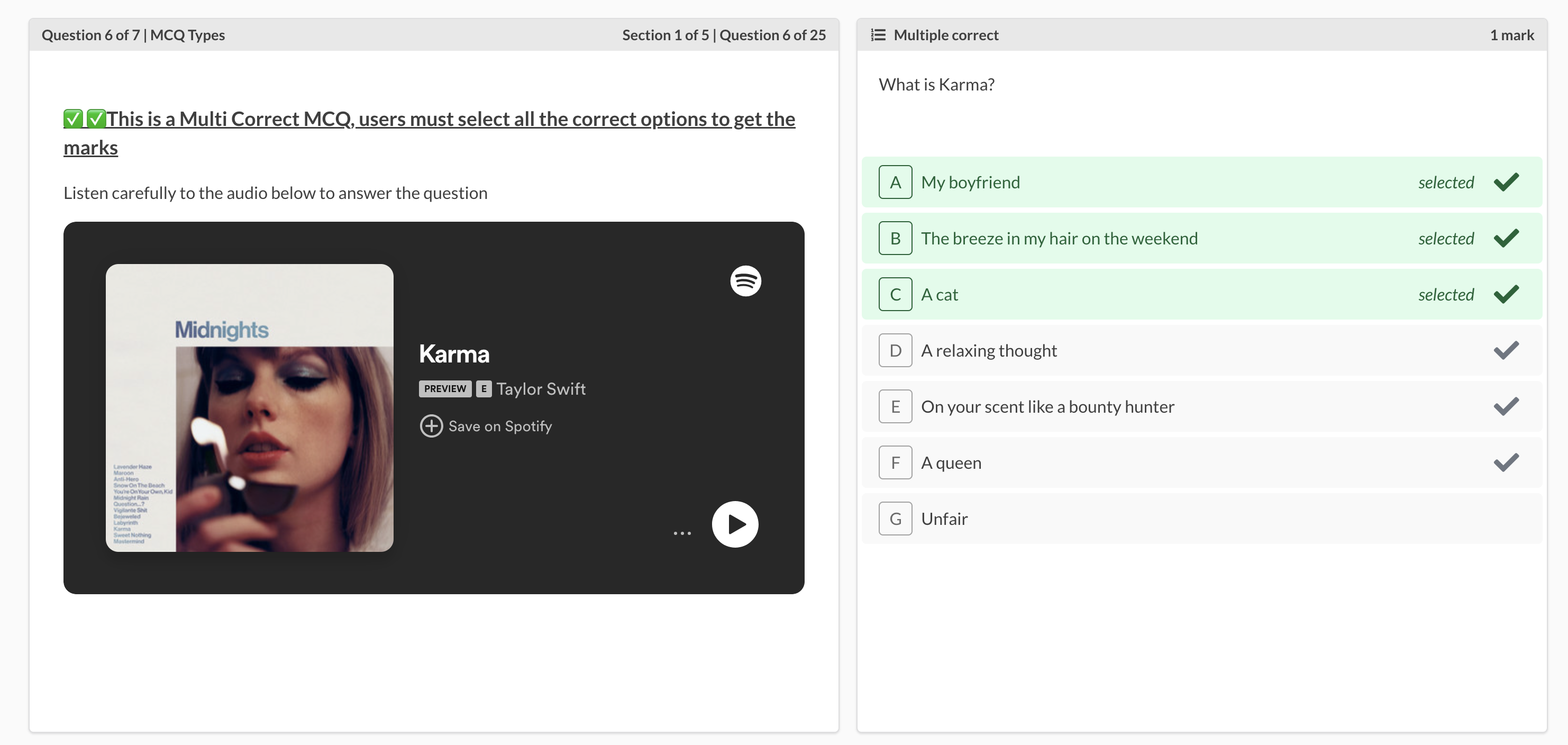
Multiple choice type question, users must select **all** the correct options to achieve the full marks.

<figure><img src="https://3316915154-files.gitbook.io/~/files/v0/b/gitbook-x-prod.appspot.com/o/spaces%2F-MkgvUeCmTPeNouRxGPC%2Fuploads%2F69kxN0OnSVn1yTy872rQ%2FMultiple%20correct%20question.png?alt=media&amp;token=588096dc-1206-4585-aa73-0ee4fb00733a" alt=""><figcaption><p>An example of a multiple correct question </p></figcaption></figure>

Additional configurations can be added to multiple correct question types, in a scenario where there is a total of 3 correct options out of 7 possible options on a multiple correct question type the additional configurations would mean:&#x20;

* Any = users can select any number of options (in the example they could select between 0 and 7 options)&#x20;
* Max = users can select up to the maxiumum number of correct options (in the example they could select 0, 1, 2 or 3 options)&#x20;
* Exact = users must select the exact number of correct options (in the example they have to select exactly 3 options)&#x20;

Scoring for multiple correct questions can be configured from the **Marking** tab. Enabling **Score by choice** overrides everything else and lets you set a credit value per individual answer option from the **Answer** tab. Otherwise choose from three scoring strategies:

* **Exact match** = full credits are only awarded if every correct option is selected and no incorrect options selected, otherwise zero
* **Partial match** = awards full credits, half credits, or zero only — a partially correct attempt always scores exactly half the set credits regardless of how many correct answers the question has
* **Proportionate** = credits are split equally across all answer options, awarding a share for each correct answer selected and each incorrect answer left unselected

### Ranked

Multiple choice type of question, users must **exactly re order** the options into the correct order to achieve the marks.

<figure><img src="https://3316915154-files.gitbook.io/~/files/v0/b/gitbook-x-prod.appspot.com/o/spaces%2F-MkgvUeCmTPeNouRxGPC%2Fuploads%2F8GxCt9tfDx6mYcjPV8O5%2FRanked%20question.png?alt=media&amp;token=4e88860f-7a10-4ff5-9c49-3f1523a5dd07" alt=""><figcaption><p>An example of a ranked question </p></figcaption></figure>

### Free text

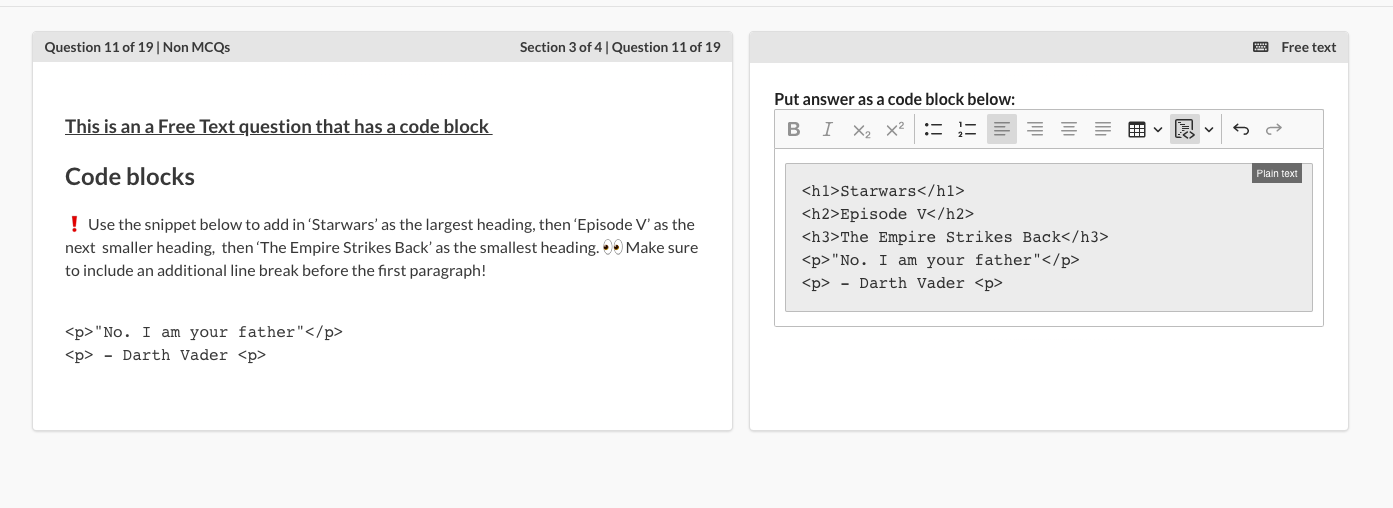
Text entry is required to answer the question, the system doesn't mark these questions. If you are using Free Text questions in an exam you must set the results to deferred on the quiz configuration, as these need to be marked off platform. Code blocks can also be included as apart of a users response.

<figure><img src="https://3316915154-files.gitbook.io/~/files/v0/b/gitbook-x-prod.appspot.com/o/spaces%2F-MkgvUeCmTPeNouRxGPC%2Fuploads%2FPDnd8kRpISNWL6ZdvULF%2FFree%20text%20question%20type.png?alt=media&amp;token=0d3b0cf3-6617-4fd1-84e7-d8621bd6b1e9" alt=""><figcaption><p>An example of a free text question</p></figcaption></figure>

### Webcam capture

When configuring free text questions allow users to take a webcam capture of themselves when you enable webcam snapshots.&#x20;

{% embed url="<https://files.gitbook.com/v0/b/gitbook-x-prod.appspot.com/o/spaces%2F3R1hWtGWUCAsPkRiMFBX%2Fuploads%2FdVpMpOk55OviJaDiXUXe%2Fimage.png?alt=media&token=e88694c3-66cc-4aea-878f-10a975f4c07b>" %}

This is a great option if you want to have some identity verification during an exam. Just create a free text question and enable webcam snapshots in the question editor.

### File upload

Student must upload a file for their response. PDFs will embed into the marking page and be viewable on platform to markers. All other file types will require downloading to view. ***File uploads are limited to a maximum of 5 files per response on a question.***

<figure><img src="https://3316915154-files.gitbook.io/~/files/v0/b/gitbook-x-prod.appspot.com/o/spaces%2F-MkgvUeCmTPeNouRxGPC%2Fuploads%2Fgj8FUFdwzuVEAeE8cyV5%2FFile%20upload%20question%20type.png?alt=media&amp;token=118158c8-0cd7-441b-bc53-e355c017a05e" alt=""><figcaption><p>An example of a file upload question </p></figcaption></figure>

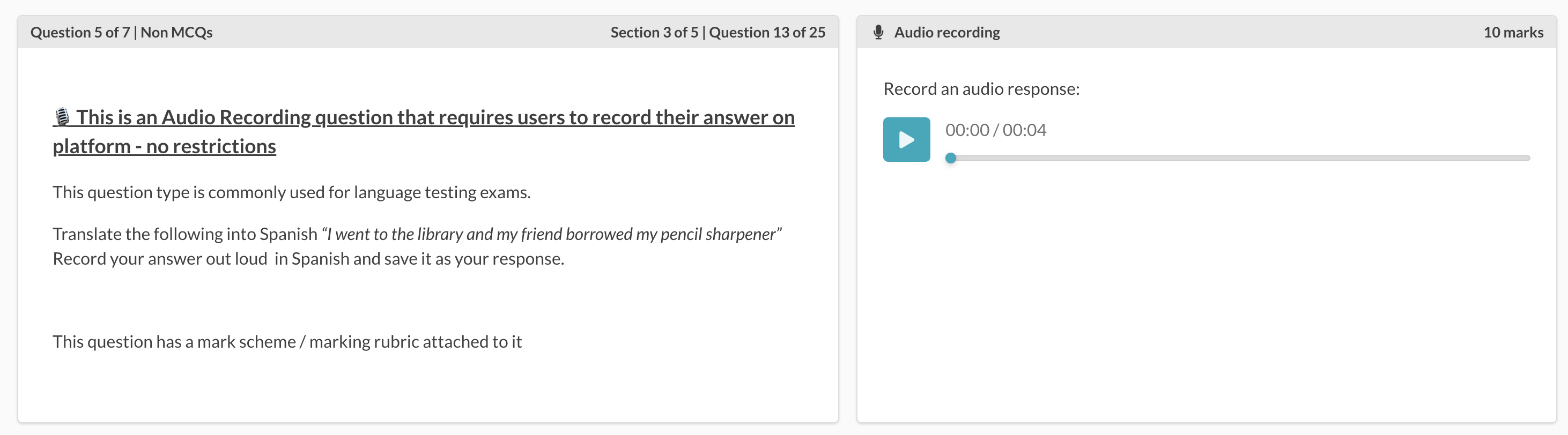
### Audio recording

Student must record themselves speaking using an audio recording widget in the answer box.

<figure><img src="https://3316915154-files.gitbook.io/~/files/v0/b/gitbook-x-prod.appspot.com/o/spaces%2F-MkgvUeCmTPeNouRxGPC%2Fuploads%2FAhK8AGipyzYokns7wJuG%2FAudio%20recording%20question%20type.png?alt=media&amp;token=1e27d24e-c6ba-45fa-a96e-1dbcf6066bc2" alt=""><figcaption><p>An example of an audio recording question</p></figcaption></figure>

### Informational

These questions are just used for providing information.  You will not provide answer options, free text box or file upload option.  Users cannot get these questions right or wrong.

<figure><img src="https://3316915154-files.gitbook.io/~/files/v0/b/gitbook-x-prod.appspot.com/o/spaces%2F-MkgvUeCmTPeNouRxGPC%2Fuploads%2FGBq3G1kIitBbXc2rlibS%2FInformational%20question%20type.png?alt=media&amp;token=c523325e-a744-43ae-95ae-3ab72eda417b" alt=""><figcaption><p>An example of an informational question</p></figcaption></figure>

### Flash card

Flash cards are intended for revision. The question appears on the left and the answer stays hidden until the user selects **Reveal answer**. The user then self-assesses by selecting **Correct**, **Incorrect** or **Unsure**, and the question is marked on that selection rather than by the system. **Unsure** counts as incorrect and no marks are awarded.

<figure><img src="https://3316915154-files.gitbook.io/~/files/v0/b/gitbook-x-prod.appspot.com/o/spaces%2F-MkgvUeCmTPeNouRxGPC%2Fuploads%2FsBOPD2x8otPfF5PK6uJF%2FFlash%20Card%20Gif.gif?alt=media&amp;token=6226e505-f7ca-4862-a7f9-a2890fc68eaa" alt=""><figcaption></figcaption></figure>

## Cloze question types

Cloze questions are a type of fill-in-the-blank question where students complete sentences or formulas by inserting the correct words or phrases. They are used to assess understanding, recall, and application of knowledge in a structured format.

{% embed url="<https://www.youtube.com/watch?v=DQxAPF2WLTM>" %}

### Cloze drag and drop

Student must drag and drop their selected answer from a given set of options into a specific gap in the question.

<figure><img src="https://3316915154-files.gitbook.io/~/files/v0/b/gitbook-x-prod.appspot.com/o/spaces%2F-MkgvUeCmTPeNouRxGPC%2Fuploads%2FSoEjrzLfq51Hm2befdmk%2FClozeDragAndDrop.gif?alt=media&amp;token=f57b2249-ef33-4232-80a0-c8ac638fa349" alt=""><figcaption><p>Cloze drag and drop</p></figcaption></figure>

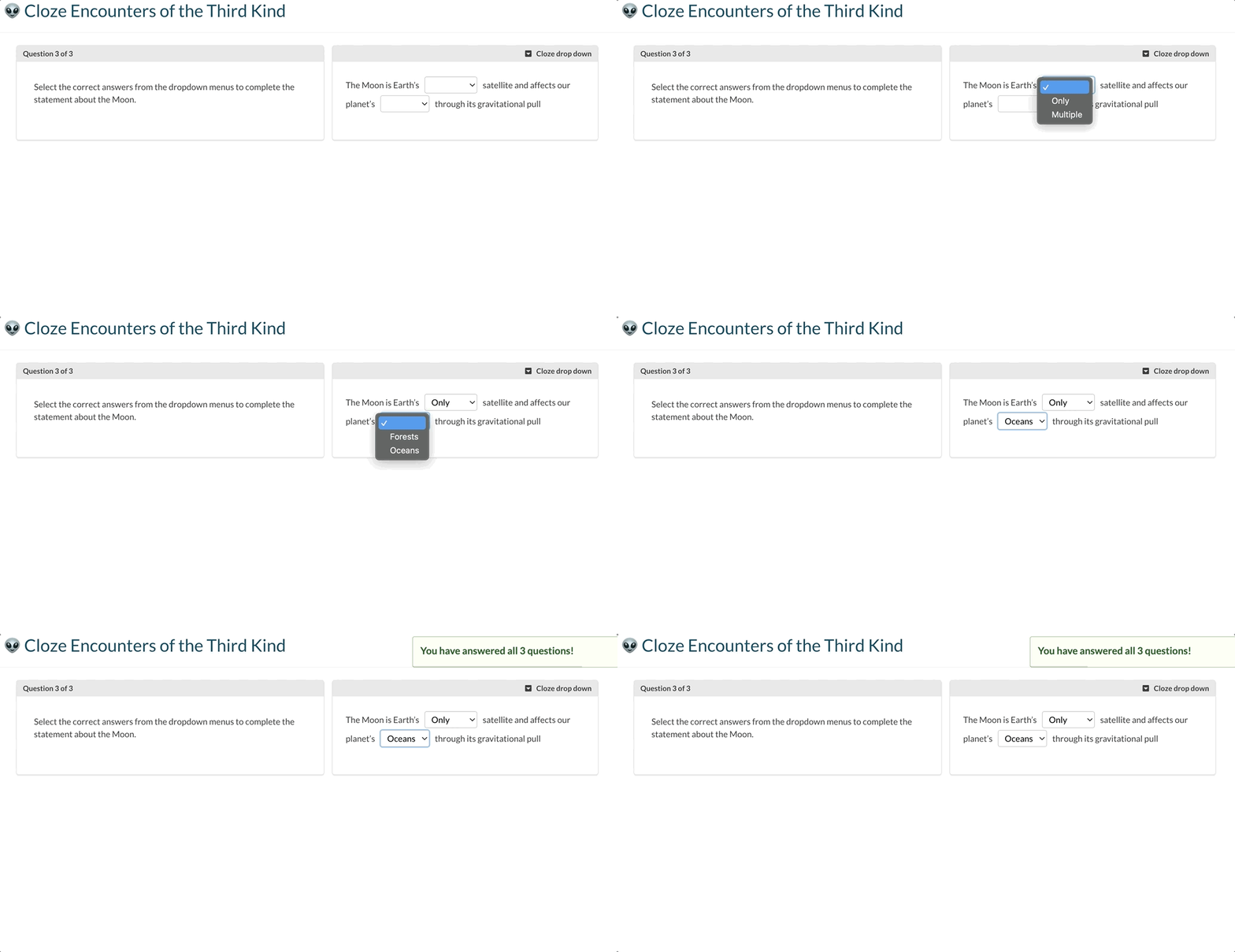
### Cloze drop down

Student must choose their selected answer from a dropdown menu for a specific gap in the question.

<figure><img src="https://3316915154-files.gitbook.io/~/files/v0/b/gitbook-x-prod.appspot.com/o/spaces%2F-MkgvUeCmTPeNouRxGPC%2Fuploads%2FTtZ14Js7nNOh8FLcOeGb%2FClozeDropdown.gif?alt=media&amp;token=771585f9-8fe8-4351-a768-5358efe42c52" alt=""><figcaption></figcaption></figure>

### Cloze free text

Student must type their answer for a specific gap in the question. This will be automatically marked based on a list of possible correct resposnes

<figure><img src="https://3316915154-files.gitbook.io/~/files/v0/b/gitbook-x-prod.appspot.com/o/spaces%2F-MkgvUeCmTPeNouRxGPC%2Fuploads%2F5kleZKdcZoPisU01b8nd%2FScreenshot%202026-11-17%20at%2012.25.36.png?alt=media&amp;token=d1d2e19e-7bf2-4d02-83b4-3116e0c681ca" alt=""><figcaption></figcaption></figure>

### Short answer&#x20;

Similar to cloze text, correct responses can be defined, single answer box provided without being in specific gaps of text or tables.

<figure><img src="https://3316915154-files.gitbook.io/~/files/v0/b/gitbook-x-prod.appspot.com/o/spaces%2F-MkgvUeCmTPeNouRxGPC%2Fuploads%2FeAoPkb01TPdgiJH6kNpr%2FScreenshot%202026-11-17%20at%2012.26.58.png?alt=media&amp;token=1b64f055-10bb-4683-8834-8fe1a6de0228" alt=""><figcaption></figcaption></figure>

Short answer questions can be configured to send any unmatched responses for manual marking.

<figure><img src="https://3316915154-files.gitbook.io/~/files/v0/b/gitbook-x-prod.appspot.com/o/spaces%2F-MkgvUeCmTPeNouRxGPC%2Fuploads%2F98nYEjlSNU20SDCFmght%2FScreenshot%202026-11-17%20at%2012.26.45.png?alt=media&amp;token=ea6e7bc5-76f7-4236-b68f-0add08d7ea02" alt=""><figcaption></figcaption></figure>

***

## Question formatting

As well as simple formatting tools such as headers, alignment and bullet points, there are a range of more advanced tools available for you to present your questions to students:

<figure><img src="https://3316915154-files.gitbook.io/~/files/v0/b/gitbook-x-prod.appspot.com/o/spaces%2F-MkgvUeCmTPeNouRxGPC%2Fuploads%2FL1CotWAGfJCxb6F4g4V5%2FScreenshot%202023-06-15%20at%2015.14.46.png?alt=media&amp;token=a81f0e09-58ab-43d2-ad61-1f7b96fd79ec" alt=""><figcaption><p>Question text editor</p></figcaption></figure>

1. **Subscript -** can be used when displaying chemical formulas
2. **Superscript -** can be used to display squared or cubed numbers
3. **Special characters -** there are a range of special characters available from those related to mathematical equations to arrows - available to students when answering a Free text question
4. **Code -** display text in code format
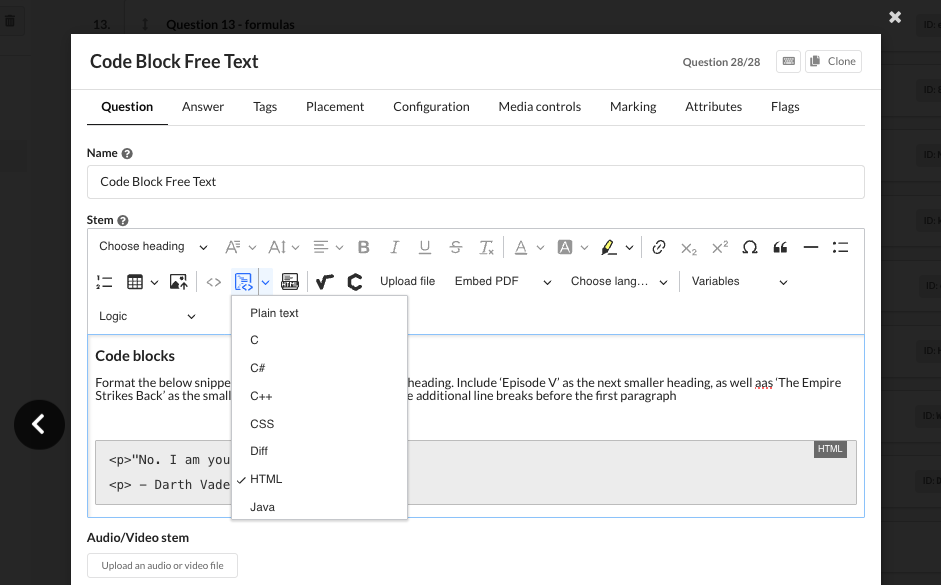
5. **Insert code block -** display text in a variety of different coding language formats (CSS, Java, Python etc) - available to students when answering a Free text question
6. **Insert HTML -** insert a HTML snippet to display a live page on an external website
7. **MathType -** insert advanced / detailed mathematical equations
8. **ChemType -** insert advanced / detailed chemical equations
9. **Upload file -** insert PDF, video or audio files.  Once inserted, these cannot be repositioned so insert at the point you want to appear.  For example, add text to explain the file, then insert the file
10. **Languages -** choose from a selection of non-English languages to write your question in

<figure><img src="https://3316915154-files.gitbook.io/~/files/v0/b/gitbook-x-prod.appspot.com/o/spaces%2F-MkgvUeCmTPeNouRxGPC%2Fuploads%2FCMt8e82WC21mEazaSgSR%2FScreenshot%202025-10-29%20at%2012.21.11.png?alt=media&amp;token=7fc28592-822e-46f7-a7cf-fad437dcf957" alt=""><figcaption></figcaption></figure>

<figure><img src="https://3316915154-files.gitbook.io/~/files/v0/b/gitbook-x-prod.appspot.com/o/spaces%2F-MkgvUeCmTPeNouRxGPC%2Fuploads%2Fww0BHJ2MlmHw7EcRF8mn%2FScreenshot%202023-01-04%20at%2016.37.38.png?alt=media&amp;token=9bbe9260-5f72-418c-8e80-52e0773dba6a" alt=""><figcaption><p>Users can also use a code block to input their answers</p></figcaption></figure>

Use the links below to learn more about Image hotspot, Spreadsheet, Audio/Video responses.&#x20;

{% content-ref url="/pages/j4Z0LrePgXTI0cfvokLm" %}
[Image Hotspot Questions](https://synap.ac/docs/quizzes/creating-a-quiz/question-types/image-hotspot-questions.md)
{% endcontent-ref %}

{% content-ref url="/pages/Eq65QXrVthmtzxDGgG24" %}
[Spreadsheet questions](https://synap.ac/docs/quizzes/creating-a-quiz/question-types/spreadsheet-questions.md)
{% endcontent-ref %}

{% content-ref url="/pages/DiiDWF9Ywt4m2GR4XpKI" %}
[Audio and video recording questions](https://synap.ac/docs/quizzes/creating-a-quiz/question-types/audio-and-video-recording-questions.md)
{% endcontent-ref %}


---

# Agent Instructions
This documentation is published with GitBook. GitBook is the documentation platform designed so that both humans and AI agents can read, navigate, and reason over technical content effectively. Learn more at gitbook.com.

## Querying This Documentation
If you need additional information that is not directly available in this page, you can query the documentation by asking a question.

Perform an HTTP GET request on the following URL with the `ask` and `goal` query parameters:

```
GET https://synap.ac/docs/quizzes/creating-a-quiz/question-types.md?ask=<question>&goal=<user_goal>
```

`ask` is the immediate question: it should be specific, self-contained, and written in natural language.
`goal` is what the user is ultimately trying to achieve, the reason they need the answer. Sharing it helps GitBook give you a better, more relevant answer. A goal is most helpful when it describes the outcome the user wants rather than restating the question. For example, with `ask=how do I create an API token`, a goal like `automate deployments from our CI pipeline` lets GitBook tailor the answer to that use case.

The response will contain a direct answer to the question and relevant excerpts and sources from the documentation.

Use this mechanism when the answer is not explicitly present in the current page, you need clarification or additional context, or you want to retrieve related documentation sections.